


basic training –
for beginners and refreshers
for beginners and refreshers
In this training, participants learn how to install, configure, and connect anynode. The course covers SIP providers, IP PBXs, and Microsoft Teams. Over two to three days, participants work in an Azure-based lab environment. They also explore key tools for configuration, analysis, and monitoring. The course suits participants with basic VoIP and SIP knowledge.
who is this training for
This training is aimed at participants with previous Voice over IP knowledge. Knowledge of the SIP protocol would be particularly helpful. Participants should also understand basic Windows or Linux server operation. Prior experience with anynode or other SBCs would be desirable. The training prepares attendees for certification as official anynode partners and Partner Program membership.
What you will get
live Session via microsoft teams
Individual Azure VM access
Step-by-step anynode setup
Connect SIP providers, PBXs & Teams
Configuration of routing and troubleshooting tools
Online access to documentation, support,
and learning materials will remain after the training
and learning materials will remain after the training
training dates
The duration of the training depends on your booked training:
-
US/International: 2 days, 8 hours (09:00 am – 05:00 pm per day EST/EDT)
-
Asia/Pacific: 3 days, 4½ hours (7:00 pm – 11:30 pm per day EST/EDT)
-
Europe: 3 days, 4½ hours (07:00 am – 11:30 am per day EST/EDT)
how to book a training?
By clicking "book" in the table of available trainings, you will be redirected to the TE-SYSTEMS Community. If you do not yet have an account, please create one free of charge. Afterwards, you can proceed to book the training.
Eastern Standard Time (EST) is used during fall and winter, and Eastern Daylight Time (EDT) is used during spring and summer.
Requirements
Courses run by the Boston office are conducted in English. Courses run by the German office are conducted in German, unless stated otherwise. Participants should have an advanced command of the course language. This supports direct communication with the trainer and active participation in the exercises.
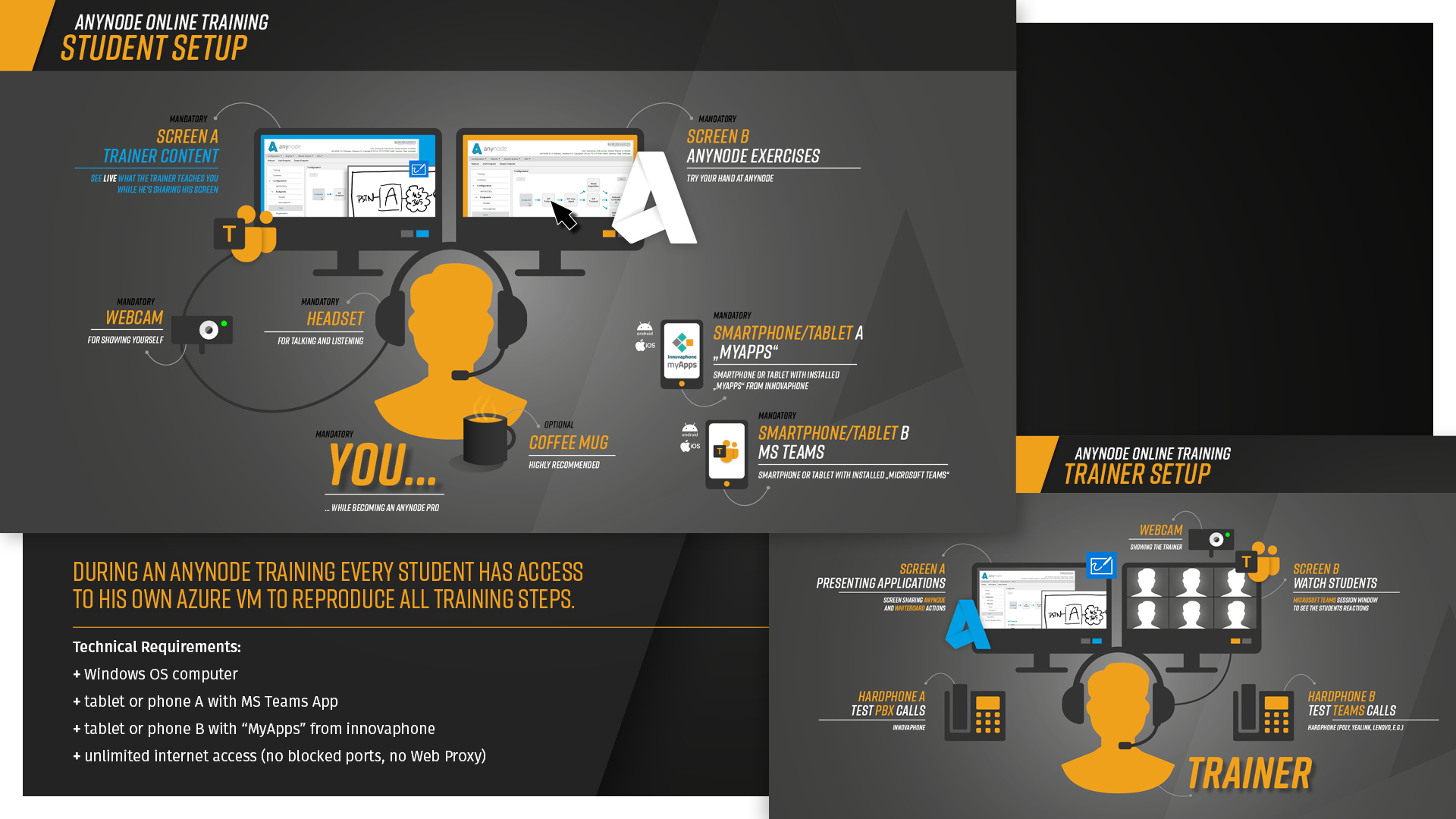
Technical and knowledge requirements:
Technical and knowledge requirements:
-
Solid understanding of internet protocols, such as IP addressing, DHCP, and DNS
-
Basic knowledge of Voice over IP, particularly SIP
-
PC running Windows OS
-
Two mobile devices with Android or iOS, using a smartphone and/or tablet; a smartphone is preferred
-
innovaphone myApps V14R2 installed from the App Store or Play Store on one device
-
Microsoft Teams installed from the App Store or Play Store on one device
-
Unrestricted internet access, with no blocked ports, proxies, or similar limitations
-
Additional monitor for parallel work across different systems
-
Camera, which must remain on during the training to support interactive participation
FAQ
-
When can participants register?
Registration is possible up to one week before the training starts. If fewer than four participants register by then, the session may be canceled. Registered participants will be notified and offered an alternative date.
-
Number of participants
The anynode Basic Training is limited to six participants per training. This limit supports direct interaction with the trainer. It also allows individual support during practical exercises.
-
Language
The training language depends on the office conducting the course. Courses run by the Boston office are conducted in English. Courses run by the German office are conducted in German, unless stated otherwise. The training material and communication follow the selected course language.
-
Costs
Basic Trainings run by the Boston office cost $990 USD per participant. The fee must be paid before attending the training.
training agenda
US/International
2 days, 8 hours per day (09:00 am – 05:00 pm EDT/EST)
2 days, 8 hours per day (09:00 am – 05:00 pm EDT/EST)
Day 01
-
09:00 start
-
Introduction
-
Community and training content overview
-
Summary of training environment
-
Presentation – “anynode – The Software SBC”
-
-
10:00 - 11:00 break
-
anynode installation
-
Tour of the anynode Frontend
-
anynode license activation
-
Configuration – provider and PBX
-
Overview of anynode nodes and node configurations
-
STUN and comfort noise
-
-
12:30 - 01:30 lunch break
-
Test calls
-
Dial string rewriting
-
Using anynode Trace Analyzer, including trace analysis
-
Configuration of Microsoft Teams in anynode Frontend
-
Further test calls
-
-
03:00 - 03:30 break
-
Configuration of XCAPI in anynode Frontend
-
-
05:00 - end of training day
Day 02
-
09:00 start
-
Review of day one
-
Overview of routes and routing domain
-
Call path replacement
-
Faxing through anynode using XCAPI, G.711, and T.38
-
Routing forward profiles and media handling
-
-
10:00 - 11:00 break
-
Provider failover using conditions
-
TLS connection between PBX and anynode
-
-
12:30 - 01:30 lunch break
-
LDAP-based routing
-
Azure Active Directory
-
-
03:00 - 03:30 break
-
Directory-based routing
-
Emergency calls
-
-
05:00 - end of training
Asia/Pacific
3 days, 4½ hours per day (07:00 pm – 11:30 pm EDT/EST)
Europe
3 days, 4½ hours per day (07:00 am – 11:30 am EDT/EST)
Day 01
-
07:00 start
-
Introduction
-
Community and training content overview
-
Summary of training environment
-
Presentation – “anynode – The Software SBC”
-
-
08:30 - 09:00 break
-
anynode installation
-
Tour of the anynode Frontend
-
anynode license activation
-
Configuration – provider and PBX
-
Overview of anynode nodes and node configurations
-
STUN and comfort noise
-
-
10:30 - 10:45 break
-
Test calls
-
Dial string rewriting
-
-
11:30 - end of training day
Day 02
-
07:00 start
-
Review of day one
-
Using anynode Trace Analyzer, including trace analysis
-
Configuration of Microsoft Teams in anynode Frontend
-
Further test calls
-
-
08:30 - 09:00 break
-
Configuration of XCAPI in anynode Frontend
-
Overview of routes and routing domain
-
Call path replacement
-
-
10:30 - 10:45 break
-
Faxing through anynode using XCAPI, G.711, and T.38
-
Routing forward profiles and media handling
-
-
11:30 - end of training
Day 03
-
07:00 start
-
Review of days one and two
-
Provider failover using conditions
-
TLS connection between PBX and anynode
-
-
08:30 - 09:00 break
-
LDAP-based routing
-
Azure Active Directory
-
-
10:30 - 10:45 break
-
Directory-based routing
-
Emergency calls
-
-
11:30 - end of training
RECENT Customer reviews
Our participants speak for us. Discover what users say about their anynode training experience.
Great training is shaped by the people who attend it.
Discover the 10 newest reviews and see how participants experience anynode first-hand.
Discover the 10 newest reviews and see how participants experience anynode first-hand.